Do you struggle to stay organized, productive, and focused while working remotely? Well, you’re not alone. Remote work can get overwhelming when you lack the right tools.
The good news is that AI tools can lighten your workload, automate the boring stuff, and help you collaborate smoothly with your offshore team. That’s why I’ve put together a list of the Best AI Tools for Remote Workers, which can simplify their day and boost their productivity.
So, are you ready to upgrade your remote work setup with AI tools? Let’s dive right in.
11 Best AI Tools for Remote Work (Quick Overview)
| Tool Name | Category | Key Features | Free Plan |
| Prezi | Presentations | AI slide generation, “Ask AI” editing | 500 credits with limited features. |
| Bubbles | Screen Recording | Chatting with AI | Unlimited screen recordings + 5 weekly meetings |
| Guidde | Documentation | AI video guides, multilingual voiceovers | 25 how-to videos with watermarks |
| Notion | Task Management | Notion AI writing, Custom workspaces | Basic forms, sites, and databases with Notion AI trial. |
| Todoist | To-Do Lists | AI task suggestions, Calendar integrations | 5 projects with 3 filter views and 1 week of activity history. |
| 1Password | Password Management | Secure password vault, Password generator | N.A. |
| NordVPN | VPN | AI threat protection | N.A. |
| Rize | Time Tracking | Automatic time tracking, Focus detection | Retain 1 day of data |
| Reclaim AI | Calendar Scheduling | AI scheduling assistant, Auto task reshuffling | Unlimited tasks, 1 scheduling link, and 1 habit. |
| Otter AI | Meeting Transcription | Real-time transcription, AI meeting summaries | 300 monthly video transcription minutes |
| Evernote | Note Taking | AI writing tools, Meeting transcription | 50 notes & 1 notebook, with a 250 MB/mo upload limit |
Best AI Tools for Presentations (2026)
1) Prezi
Want to turn your plain ideas into interactive and eye-catching presentations? Try Prezi! Simply enter your topic with a short description or upload your files in PPT, PDF, or DOCX formats. Prezi generates a deck of 20+ slides with relevant text, catchy visuals, and smooth animations.

If you want to customize anything, just ask their built-in “Ask AI” editor. It can summarize your text, turn paragraphs into bullets, and even highlight key points. It’s perfect for simplifying complex ideas during remote discussions.
How is Prezi valuable for remote teams? First of all, it lets you present alongside your PPT. So your face stays on the screen, boosting audience engagement during meetings. Next, its unique ‘Zoom to Frame‘ effect jumps from one topic to another like a story, keeping the viewers visually engaged.

Remote workers can easily convert complex information into easy-to-follow timelines, story blocks, flowcharts, animated stories, etc. Besides offering smooth integrations with all major conferencing apps, Prezi also features interactive widgets like nametags, countdown timers, etc, for engagement.
Finally, it lets you share your PPTs with your team via links. You can also use Prezi analytics to track views, engagements, and viewer activity. Recently, they’ve also launched an AI image generator that creates relevant visuals for you.

Overall, if you’re working remotely and wish to create visually attractive AI presentations, Prezi is your best bet!
Pricing: The free plan offers 500 credits with limited features. Its paid plans start from $15/month, which features unlimited credits.
Best AI Tools for Recording & Documentation
2) Bubbles
Remote working professionals often need to record and share their screens, and also take meeting notes. Bubbles makes it all easy! It’s a modern screen recording and note-taking tool with a Chrome extension.
You can use it to record your screen and camera, upload an already recorded meeting, or connect your calendar to record live meetings. It offers seamless integration with Google Meet, Teams, and Zoom apps.

But that’s not all. Once your meeting is processed, you can use the Bubbles AI assistant to discuss the meeting. You can use the chat interface to ask questions regarding the meeting or request it to summarize, shorten, explain complex points, etc.
For remote workers, Bubbles enhances productivity and helps them save hours spent on rewatching recordings to understand the key points.
Pricing: Its free plan lets you record unlimited screen recordings and 5 meetings per week (30 mins/recording). You also get AI summaries and action items. If you need AI transcripts, upgrade to its paid plans for $12/month.
3) Guidde
Guidde is an AI-powered video documentation platform that can create simple how-to guides, SOPs, training materials, and onboarding docs from your videos. You simply need to record your process, and it converts it into a full-fledged guide with steps, captions, and AI voiceovers.

It features 200+ AI voices and languages, so you just record once and convert into different languages as per your clients. In its video editing interface, you can also edit captions, add elements, audio, background image, text, and more.

Guidde packs insane value for remote workers. It bridges the communication gap by explaining complex processes with step-by-step annotated guides. It also saves you time by letting you share Guidde links instead of explaining the process separately to multiple people.
Overall, it is ideal for remote teams, customer support teams, onboarding and sales teams, training and product teams, etc.
Pricing: The free plan of Guidde allows you to create 25 how-to videos with watermarks. Its paid plans start from $16/month, where you can create unlimited videos.
4) Notion
Notion is one of the most popular and widely used project management tools. It is basically a digital workspace for organizing your projects and managing your workflow.
With Notion, you can create pages, wikis, databases, Kanban boards, lists, and a lot more from scratch or using pre-designed templates.All you need to do is press the forward slash (/) command, and it lets you access the basic blocks, media elements, views, import options, etc.

Now, you also get Notion AI, which is their AI assistant built within the platform. It helps with content summarization, note-taking, automation, etc, to boost your productivity. It is perfect for working professionals, students, corporates, and productivity-enthusiasts.
I have been using Notion for the last 5 years to manage my team projects remotely. The best part about Notion is its ease of use and minimalistic UI. It has a very steep learning curve, so anyone, from a beginner to a professional, can use it right away!
Pricing: Its free plan lets you create basic forms, sites, and databases. You also get Notion Calendar, Notion Mail, and a trial of Notion AI. If you have a small team, you can upgrade to its paid plans starting from $10/month.
5) Todoist
If you specifically want to create to-do lists, there’s no better tool than Todoist. Trusted by over 50 million professionals, Todoist lets you organize your daily tasks and stay productive. While specifying your tasks, you can add a due date, location, deadline, priority level, reminders, etc.

Todoist allows you to integrate with third-party services like Google Calendar, Outlook Calendar, Habit Tracker, etc, to streamline your workflow. On its paid plans, Todoist even features an AI Assistant, which offers tips, lists of task suggestions, breaks down complex tasks, and more.
Overall, it’s perfect for students, professionals, and small remote teams who want to manage their everyday tasks with ease.
Pricing: The free plan lets you create 5 personal projects with 3 filter views and 1 week of activity history. If you want extended limits, upgrade to its paid plans starting from $2/month, where you get 300 personal projects, 150 filter views, and unlimited activity history.
6) 1Password
Today, every one of us has accounts on multiple online services, like social media, banking, productivity tools, mailing services, and more. But remembering passwords for each of them is difficult. This is where 1Password can help!

1Password is a password manager that securely stores your sensitive information, like passwords, credit card details, notes, etc. Besides this, it also works as a password generator, allowing you to create strong passwords and passphrases, and also share them with others.
Whenever you visit any website, 1Password auto-captures and auto-fills your passwords for you as well. The best part is its cross-platform availability. So, you can easily access it on the web, desktop, or even mobile.

Overall, 1Password could be highly valuable for remotely working individuals and teams who rely on their memory for remembering passwords. I’ve personally been using its Family plan for the last few years to work with my remote team.
Pricing: 1Password currently offers no free plans. You can get its free trial for 14 days. Its paid plans start from $2.99/month.
7) NordVPN
As a remote worker, you may need to access the company’s sensitive files and emails over public networks or Wi-Fi, which is unsafe. Therefore, you should use NordVPN. It’s one of the fastest and most secure VPNs on the market.
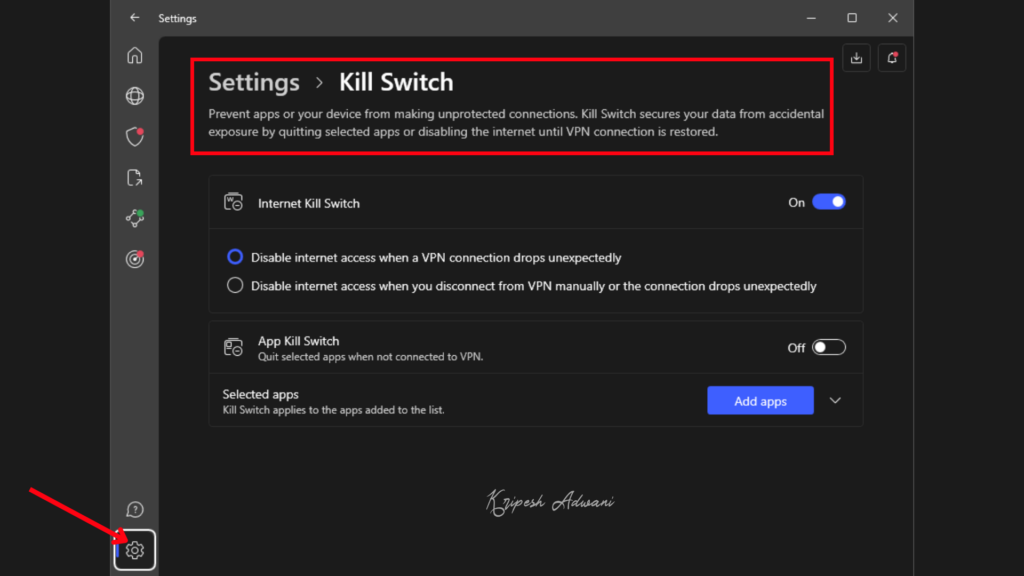
It offers swift download speeds, a network of 6,000+ RAM-only servers, strong AES-256 encryption, and a strict no-log policy. You also get major security features like a kill switch and split tunnelling. It also features a Threat Protection feature powered by AI to scan your files and detect threats.

Overall, NordVPN is ideal for remote workers, businesses, and digital professionals who wish to secure remote connections, ensure high-speed performance, block ads and malware, and enable safe access to geo-blocked tools.
Pricing: NordVPN doesn’t feature a free plan. Its paid plans start from $2.88/month when purchased for 2 years.
8) Rize
Rize is an AI-powered time tracking desktop application. It’s different from other time trackers because you don’t need to start or stop any timers here. It uses AI to track the time you spend on your computer automatically.

To enhance your productivity and focus, it also offers tools like Distraction Blocker, Focus Music, and Session Timer. Talking about AI, Rize is equipped with multiple AI features to ease your workflow.
- Automatic Project Tagging: AI automatically tags blocks of time with project tags to better analyze how you spent your time.
- AI Notifications: As per your activity, AI will notify you when you should take a break, stop working to avoid overwork, and if it finds any time slots for deep work.
- AI Focus Time Detection: AI analyzes how focused you are at work and which apps are distracting you the most.
- AI Time Categorization: It offers suggestions for categorizing your time efficiently.
If you want, you can also integrate Rize with popular apps like Google Calendar, ClickUp, Zapier, and Outlook Calendar to streamline your meetings with your tasks. Rize is available as a desktop app for Mac and Windows devices.

Overall, Rize is a valuable tool for remote workers. If you want to maximize your productivity while working remotely, you should definitely try it.
Pricing: The free plan of Rize retains 1 day of data. Its paid plans start from $12.99/month and retain all tracking data.
9) Reclaim AI
Reclaim is an AI-powered calendar for automatic scheduling with over 600k+ users. It integrates with your Google and Outlook calendars to find the best time for focus, breaks, and tasks. All you need to do is connect your calendar and choose your goals.

Talking about its AI features, I liked its AI scheduling assistant. It optimizes your meeting time throughout the week, protects your focus time, and removes distractions to get things done. If a new priority task comes in, it automatically reshuffles existing tasks so you can stay focused.

Reclaim AI offers integrations with popular services. The free plan lets you integrate with Google Calendar, Zoom, Microsoft Teams, Google Tasks, Slack, and RayCast. On the paid plans, you can also connect with Todoist, ClickUp, Jira, Asana, etc.
For solo remote workers, Reclaim AI can prove highly useful. It can help them improve their focus and productivity to the next level.
Pricing: The free plan of Reclaim AI offers unlimited tasks, 1 scheduling link, and 1 habit. Its paid plans start from $10/month.
10) Otter AI
If your work revolves around remote meetings, Otter AI would add immense value to your workflow. It is one of the most efficient AI meeting assistants for modern remote professionals. It can accurately transcribe both live meetings and pre-recorded audio or video files with time stamps.

You can easily integrate Zoom, Google Meet, etc, and get real-time transcriptions with automatic summaries, AI-generated outlines, action items, and key points. It also adds screenshots from the meeting, relevant keywords from the discussion, and speaker contribution percentage. I loved its accurate speaker identification.
What makes Otter especially useful for remote teams is its collaborative workspace, which is even available on the free plan. It lets you add up to 5 members, share meeting notes, and review highlights together, ensuring everyone stays aligned.

Otter AI also features custom AI-powered templates for different meeting types, from product demos to sales calls, to help you get structured insights. If you are looking to simplify your communication and documentation while working on a remote setup, Otter AI would be of great help.
Pricing: The free plan of Otter AI offers 300 monthly video transcription minutes. Its paid plans start from $8.33/user/month, where you get 1200 monthly transcription minutes.
11) Evernote
Evernote is an AI-powered note-taking app. You can use it to create digital notes with text, audio, images, and web content and store them securely on the cloud. It also features a notes template gallery for school, work, and life-related notes.

Talking about AI features, Evernote is equipped with multiple AI features like Help Me Write for AI assistance, AI summaries, tone adjustment, paraphrasing, meeting transcription, etc help in converting raw data into clear emails, documents, and action items.
Evernote is especially valuable for remote teams because of its shared task management, quick search, structured documentation, and syncing across all devices. Overall, it is a reliable tool for managing information on the go.

You can organize notebooks, save web content, digitize physical documents, search across handwritten notes or PDFs, and work offline from any device, making it a reliable tool for managing information on the go.
Pricing: The free plan allows users to create up to 50 notes and 1 notebook, with a monthly upload limit of 250 MB. Its paid plans start from ₹249.91/month on an annual subscription, where you get a limit of 1000 notes, 20 notebooks, and 3 devices.
We looked at the best AI tools you could use if you’re working remotely. But what are the benefits of these tools? Let’s look at that below.

1) Boost Productivity
With AI tools, you can automate repetitive tasks like note-taking, task scheduling, transcription, etc. This would leave more time to focus on things that actually matter.
2) Enhance Team Communication
Remote workers usually struggle with effective communication and team collaboration. With AI tools, they can get real-time AI-generated summaries for meetings, extract key tasks and action points, and thus stay on track with the team.
3) Improve Focus
AI tools can maximize focus for remote workers by removing distractions, creating automated workflows, and providing reminders and actionable insights on their projects.
Why Should You Trust Me?
I’ve been working full-time in the digital industry since 2015, and nearly all of that experience has been remote. Over the years, I’ve tested and relied on countless productivity tools, from Mac apps and Chrome extensions to AI assistants like Merlin and Voila, to stay focused and productive.
As a remote professional, I understand how the right AI tools can simplify workflows, reduce manual tasks, and help you stay productive across different projects and time zones. I’ve also extensively reviewed categories like AI art generators, AI video tools, AI voice platforms, and AI website builders, with creators and remote teams in mind.
After years of using, comparing, and reviewing these tools in real work scenarios, I know what actually works. I only recommend tools that genuinely make remote work easier, faster, and more effective.
Conclusion
In this article, we discover the Best AI tools for remote work. These tools can help you save a chunk of time and effort spent on manual tasks. They can also simplify your workflow and boost productivity to the next level.
My favorite AI tool is Rize AI. I’ve been using it for quite a while, and it has really helped me stay focused on my tasks and projects. It is one of the best apps for boosting productivity in your remote job.
Anyway, do you use any AI tools for remote work? Which one do you find the most effective? Do you have any other recommendations for us? Do share in the comments section below. We will try to review and include it on our list. This is Kripesh, signing off. Cheers, and keep learning.